Here’s a small annoyance that added up over hundreds of logins: every time I SSH or mosh into a machine, I have to remember what tmux sessions are running, type tmux ls, squint at the list, then tmux attach -t whatever. Or forget, start a fresh shell, and lose track of the session I actually wanted.
Multiply that by every reconnection — and when you work over mosh from a laptop that constantly sleeps, changes networks, and drops connections, that’s a lot of reconnections — and it becomes real friction.
So I built tmosh: a tiny Rust binary that greets me on every SSH/mosh login and just asks what I want to do.
Born at a Conference, from Friction Felt Fifty Times a Day
tmosh has a very specific origin. I was at Off the Radar with Antoine Perdaens, both of us heads-down on our own projects, running Claude Code sessions against remote environments. Conference WiFi behind a VPN is exactly the flaky nightmare you’d imagine, so the setup was the obvious one: mosh in so the session survives the drops, then tmux so nothing dies when the connection blinks.
Which meant every single login was the same dance — mosh, tmux ls, squint at the list, attach to the right detached session or spin up a new one. Every. Single. Time. At some point I said it out loud: “this is a waste of 15 seconds, fifty times a day.”
So we built tmosh right there, at the conference, with Claude — including the stretch where Claude itself had an outage and we just kept going anyway. That’s the whole ethos of the thing: the best tools come from the friction you feel fifty times a day, and this one was literally built inside the friction it fixes.
The Problem: tmux Is Great, Attaching to It Is Tedious
If you work on a remote machine, tmux is non-negotiable. It’s what keeps your work alive when your connection dies. Your build keeps running, your editor stays open, your logs keep scrolling — all detached, waiting for you to come back.
But the “coming back” part is manual, and it’s manual every single time:
$ ssh dev-server
Last login: ...
$ tmux ls
api: 3 windows (created Mon Jul  7 09:14:32 2026)
scratch: 1 windows (created Tue Jul  8 16:02:11 2026)
$ tmux attach -t api
Three steps, every login. And the failure mode is worse than the friction: half the time I’d forget, land in a bare shell, start working, and only later realize I’d orphaned the session I actually wanted. Now I’ve got two api sessions and no idea which one has my running server.
I wanted logging in to feel like opening a laptop lid: I’m either back exactly where I was, or I deliberately start something new. No archaeology.
The Solution: Ask Me the Moment I Log In
tmosh runs automatically on interactive login and presents a small picker:
- Attach to any existing (detached) tmux session
- Create a new tmux session
- Drop to shell — press
Escand you get a plain shell, no tmux, no fuss
That’s the whole idea. Navigate with ↑/↓ (or j/k if your fingers live in vim), Enter to select, Esc/q/Ctrl-C to escape to a shell.
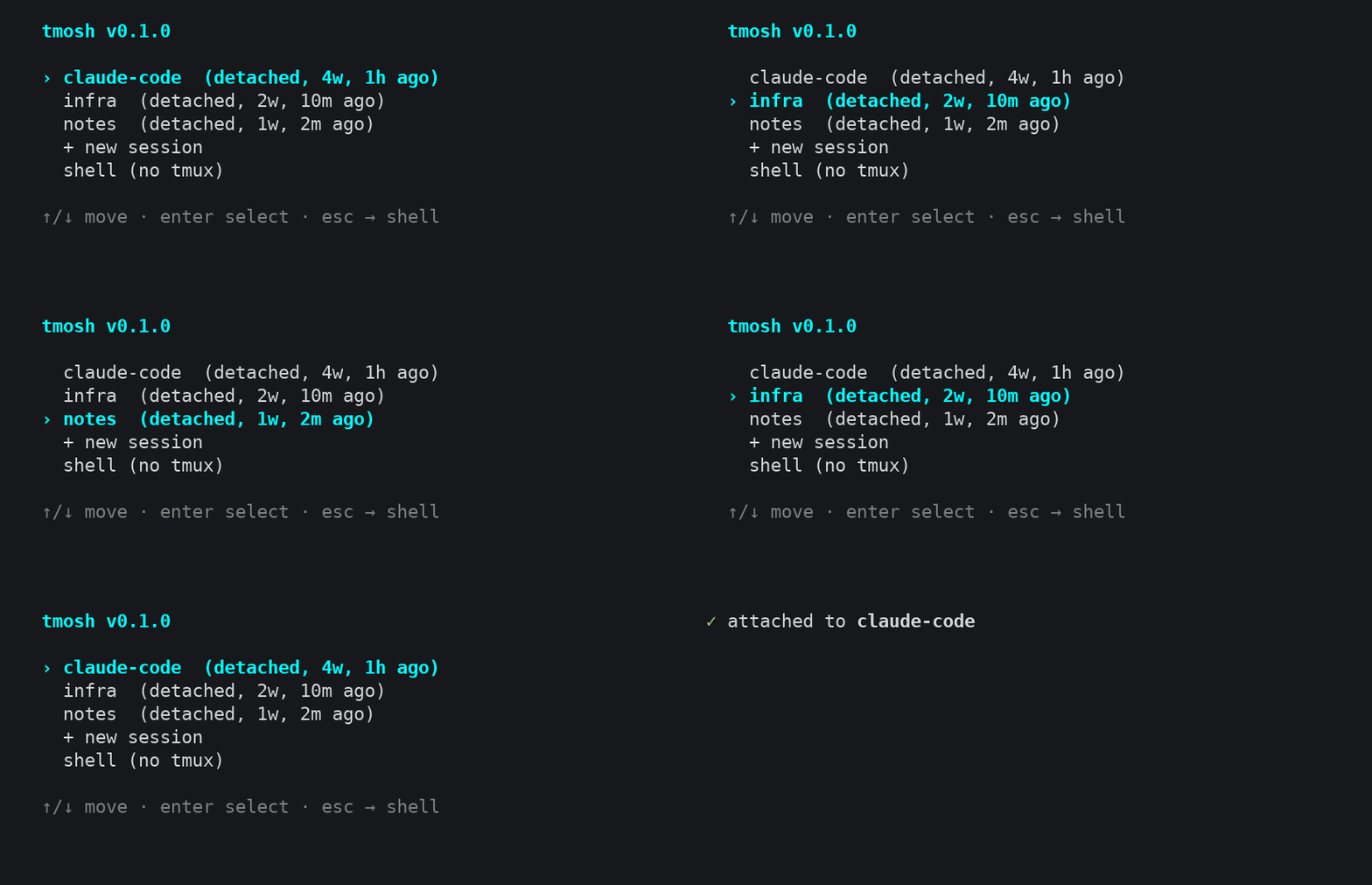
The escape hatch matters more than it sounds. I don’t want a tool that forces me into tmux — sometimes I’m just hopping in to tail a file or run one command. tmosh gets out of the way when I want it to, and greets me when I don’t.
Installation
One-line installer that grabs a precompiled binary and drops it in ~/.local/bin:
curl -fsSL https://raw.githubusercontent.com/totophe/tmosh/main/install.sh | shThen wire it into your shell so it runs on login:
tmosh --init >> ~/.zshrc     # or ~/.bashrc
source ~/.zshrc
That’s it. Next time you log in, tmosh greets you.
Making It Launch on Connect — Safely
The interesting part is that tmosh --init line. It doesn’t just blindly run tmosh on every shell — that would be a disaster. It emits a guarded snippet that only fires when it should:
- Only in interactive shells — so it never interferes with
scp,rsync, or scripted SSH commands. Nothing is more frustrating than a login greeter that breaks your automation. - Never when you’re already inside tmux — no recursion, no picker-inside-a-picker.
- Never in non-TTY sessions — pipes and non-interactive contexts are left completely alone.
This is the difference between a toy and something you actually leave in your .zshrc. I run this on every machine I touch, and it has never once gotten in the way of a scripted transfer. That’s by design.
The Details That Make It Disappear
The best tools are the ones you stop noticing. A few decisions push tmosh in that direction:
It leaves no wrapper process behind. tmosh doesn’t sit between you and tmux for the life of your session. It execs tmux attach or tmux new-session and then replaces itself. Once you’re in tmux, tmosh is gone — no lingering parent process, no overhead, nothing to leak.
It’s a single static binary. Written in Rust, no runtime, no config file required. Drop the binary on a machine and it works. It builds for Linux (x86_64, aarch64) and macOS (aarch64), which covers every box I care about.
It degrades gracefully. No tmux installed? tmosh quietly does nothing and hands you your shell. Already in a session? Same. It never errors out in your face on login — the one place you absolutely cannot afford a broken tool.
It updates itself, politely. Run tmosh --update to grab the latest release. It also checks for updates on its own at most once per 24 hours, in a way that never blocks your login. Think oh-my-zsh’s update prompt, minus the wait.
The Full Command Surface
There isn’t much to learn, which is the point:
tmosh              # Launch the interactive session picker
tmosh --init       # Print the shell snippet for your rc file
tmosh --update     # Check for and install the latest release
tmosh --version    # Print version information
tmosh --help       # Show help
Where It Fits
tmosh sits right at the transport boundary. Whether you connect over plain SSH or over mosh — the mobile shell built for exactly the flaky, roaming, high-latency connections I live on — tmosh is the first thing that runs once you’re in. It doesn’t care how you got there; it just makes sure you land somewhere useful.
For me, it’s become the front door to a larger remote-development setup: mosh in, tmosh greets me, and from there I drop into the right project environment. But even on its own, on a single server, tmosh removes a papercut I felt every single day.
If you live over SSH, give it a login or two. I think you’ll stop wanting to go back to typing tmux ls.
Fork it on GitHub
Want to try tmosh or contribute to the project?
The first thing that greets me on every SSH login — a session picker that owns the tmux greeting.
Star the repository if you find it useful, report issues or suggest features, and contribute improvements to the session picker.

He runs Wellmade, a product engineering studio, and still writes the code. Twenty years of building products for companies that wanted the thinking and the building done by the same person.
This article was co-written with AI — in the loop from the first draft to the last edit. The argument, the checking and the final word are mine.